

Your transportation business might be running great routes, maintaining a clean fleet, and delivering excellent service — but if your Google Business Profile is incomplete or set up incorrectly, potential clients searching nearby simply won't find you. That's a real problem. Every day without a properly optimized profile is a day your fleet stays parked while competitors pick up the bookings you should be getting. This guide walks you through every step of setting up your Google Business Profile correctly, with specific tips for transportation companies operating in the U.S. and Caribbean, so more searches turn into actual calls and confirmed rides.
Table of Contents
- What you need before starting
- Step-by-step setup for transportation businesses
- Verification: How to get your listing live
- Avoid these common mistakes (so your profile stays live)
- Measuring results and next steps
- The real secret: Why most Google Business Profiles for transportation struggle (and how to win locally)
- Take your transportation business further with local SEO and Google profile experts
- Frequently asked questions
Key Takeaways
| Point | Details |
|---|---|
| Essential info | Start with a business-associated Google account and clear info like name and service area for a smooth setup. |
| Tailored setup | Choose the right settings for transportation—service areas, branded vehicles, and category selection matter. |
| Verification tips | Prepare real business assets and opt for video or postcard verification as your business type requires. |
| Avoid suspensions | Never keyword stuff or exaggerate your coverage area, or your profile may disappear from search. |
| Continuous improvements | Monitor analytics, add new photos, and keep your profile updated to win more local clients. |
What you need before starting
Before you dive into the setup steps, make sure you have everything you need to avoid delays and verification issues.
Getting organized upfront saves you a lot of frustration later. Transportation businesses often run into problems during setup because they're missing key details or they've made category choices that hurt their visibility right from the start. Let's fix that before it happens.
Here's what you need to gather before you open business.google.com:
- A business-associated Google account (not a personal Gmail)
- Your exact legal business name — no added keywords like "Best Miami Limo Service LLC"
- A physical address or defined service area (cities, ZIP codes, or regions you serve)
- Primary and secondary business categories researched in advance
- Phone number and website URL
- Business hours, including holiday schedules
- Business license or registration documents for verification purposes
- Photos of branded vehicles, signage, or your operating location
For transportation companies specifically, the category you select matters enormously. Understanding the Google Business Profile basics before you start will help you make smarter choices from the beginning. Common primary categories include "Trucking company," "Bus company," "Limousine service," "Taxi service," and "Transportation service." You can add up to 9 secondary categories, which gives you room to reflect the full scope of what you offer.
| What you need | Why it matters | Transportation-specific note |
|---|---|---|
| Google business account | Required to create and manage the profile | Use a company email, not personal |
| Exact business name | Prevents suspension for keyword stuffing | No added descriptors in the name |
| Service area or address | Defines where you appear in search | SABs hide address; storefronts show it |
| Primary category | Determines what searches you show up for | Choose the most specific match |
| Secondary categories | Expands your search footprint | Up to 9, based on actual services |
| Business license | Needed for verification in some cases | Keep a digital copy ready |
| Branded vehicle photos | Speeds up video verification | Clear shots of logo and vehicle |
Pro Tip: Look up 3 to 5 direct competitors on Google Maps and note their primary categories. This tells you what's working locally. Just don't copy their list wholesale — category stuffing risks suspension and Google will catch it.
You can also browse the SEO and marketing tips on the CBM Agency blog to get a broader picture of how category choices fit into your overall local search strategy.
Step-by-step setup for transportation businesses
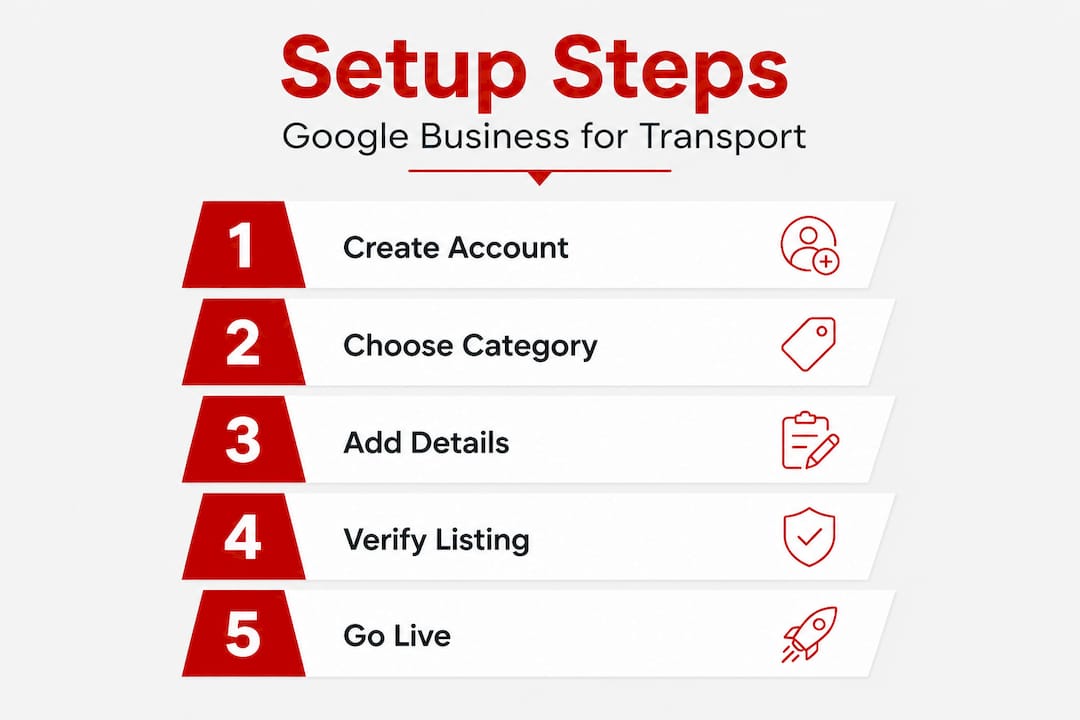
Now that you've gathered your details, follow these steps to create a trustworthy and optimized Google Business Profile specifically for transportation.
- Go to business.google.com and sign in with your business Google account.
- Enter your business name exactly as it appears on your license or branding. Resist the urge to add city names or service keywords here.
- Select your primary business category. For most transportation companies, this is where you'll choose something like "Limousine service," "Trucking company," or "Courier service." Be specific.
- Choose your business type. This is where transportation companies often need to make a careful decision. You have three options: a storefront (customers come to you), a service area business or SAB (you go to customers), or a hybrid of both.
- Set your service area. For transportation service area businesses, select "I deliver goods and services to my customers," hide your address, and define your coverage using cities or ZIP codes. You can add up to 20 service areas, and they should all fall within roughly a 2-hour drive from your base.
- Add your contact information. Include your primary phone number and website. Make sure these match exactly what appears on your website and any other directories — this consistency is called NAP (name, address, phone) and it directly affects your local rankings.
- Set your business hours. Be accurate. If you run 24/7 airport transfers, show that. If you have set dispatch hours, list them clearly.
- Add your business description. Write 2 to 3 sentences that describe what you do, who you serve, and where. Keep it factual and clear.
- Upload photos. Start with your branded vehicles, your team, and any physical location. Quality photos build trust fast.
Here's how the three profile types compare, so you can pick the right one for your operation:
| Profile type | Show address? | Service area? | Best for | Verification method |
|---|---|---|---|---|
| Storefront | Yes | Optional | Terminal, depot, or office | Postcard or video |
| Service area (SAB) | Hidden | Required | Delivery, chauffeur, courier | Video verification |
| Hybrid | Yes | Yes | Dispatch office + field service | Postcard or video |
One important note: no PO boxes or virtual offices are allowed as your business address. If you're operating from a home base and traveling to clients, that's fine — just hide your address and define your service areas instead. If you run multiple staffed locations, each one needs its own separate profile.
Pro Tip: If you're going through video verification, make sure your branded vehicle is clearly visible in the footage. A company logo on the door, a fleet number, or a wrapped vehicle all count as real-world proof that your business is legitimate. This is especially important for branded vehicle verification in markets like South Florida and the Caribbean where competition is high.
Important: Entering an inaccurate address or selecting categories that don't match your actual services are two of the most common reasons Google suspends transportation business profiles. Take your time with these fields — getting them right the first time is far easier than recovering from a suspension.
For a more detailed walkthrough with screenshots, check out this easy guide to create a Google Business page that covers the full process visually.
Verification: How to get your listing live
With your business details set, the next step is getting your listing live on Google — which means passing verification.
Verification is Google's way of confirming your business is real and operating where you say it is. For transportation companies, this step can feel stressful, but it's straightforward if you're prepared.
Most service area businesses in the U.S. and Caribbean will go through video verification, which means recording a short video that shows your business in action. Storefront-based operations (like a dispatch office or terminal) may receive a postcard with a verification code sent to their physical address.
Here's what to prepare for a smooth verification for transportation businesses:
- Branded vehicles clearly showing your company name or logo
- Business signage at your office or garage, if applicable
- Business license or registration document ready to reference
- Consistent NAP across your website and the profile you're submitting
- A stable internet connection for the video call or upload
- Real operating environment — show your dispatch area, vehicles in a lot, or a driver in uniform
Typical verification takes anywhere from a few days to a couple of weeks. Branded vehicles are critical for transportation companies going through video verification, so don't skip the prep work. If your video is unclear or doesn't show enough proof, Google may reject it and ask you to resubmit.
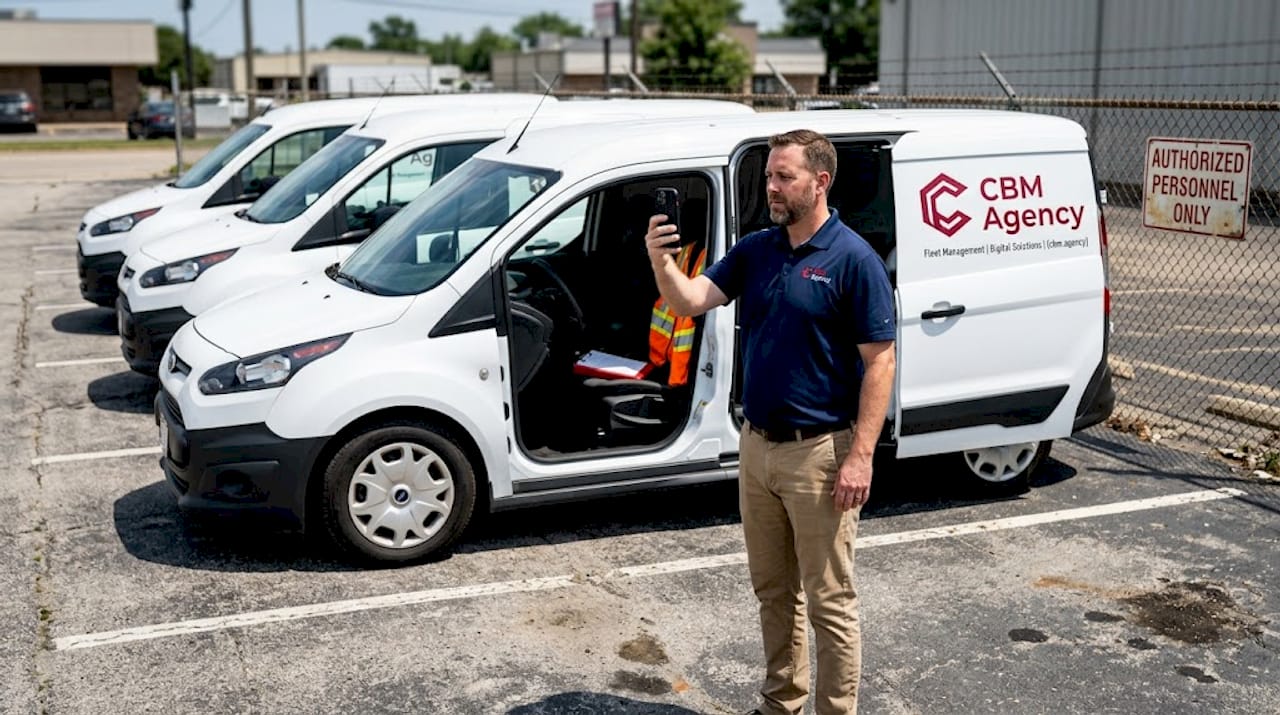
Pro Tip: Record a short practice video before your actual submission. Walk through your lot, show your vehicles with logos visible, and narrate what your business does. This helps you feel confident and ensures the footage is clear and useful.
If your verification stalls or gets rejected, don't panic. Contact Google Business Profile support directly through the Help Center. Be ready to provide documentation and explain your business model clearly.
Avoid these common mistakes (so your profile stays live)
Getting verified is only half the battle — staying visible and trusted means avoiding common missteps.
Transportation businesses lose visibility and bookings every day because of errors that are completely preventable. Here are the most frequent ones to watch for:
- Keyword stuffing your business name. Adding "Best Limo Miami" or "Affordable Charter Bus Florida" to your official name field is a direct violation of Google's guidelines and a fast path to suspension.
- Inconsistent NAP information. If your phone number on Google doesn't match your website or your Yelp listing, Google's algorithm loses confidence in your profile and your rankings drop.
- Skipping verification. An unverified profile is essentially invisible in local search. Clients can't find you, and you can't respond to reviews or update your information.
- Overextending your service area. Listing cities that are more than a 2-hour drive away doesn't expand your reach — it signals low trust and hurts your conversion rate with clients who actually need you.
- Ignoring reviews and questions. Google rewards active profiles. A profile with no responses looks abandoned, which discourages both Google and potential clients.
- Using a PO box or virtual office as your address. This violates Google's address requirements and can trigger an immediate suspension.
If your profile does get suspended, start by reviewing Google's guidelines to identify the likely cause. Submit a reinstatement request with clear documentation of your business. Most suspensions for transportation companies come from address or category issues, and they're fixable with the right evidence. Review the business profile best practices to make sure you're aligned with Google's current standards before you reapply.
Measuring results and next steps
After your profile is live and error-free, focus on growing value and learning from your results.
Your Google Business Profile isn't a set-and-forget tool. It's a booking engine, not a brochure. The businesses that win locally are the ones that treat their profile as an active asset and update it consistently.
Here's what to track every month:
- Profile views — how many people saw your listing in search or on Maps
- Website clicks — how many clicked through to your site from the profile
- Direction requests — a strong signal of local intent, especially for terminals or depots
- Call volume — track calls directly attributed to the profile
- Photo views — higher photo engagement often correlates with more bookings
- Review count and rating — monitor new reviews and respond to every one
Beyond tracking, keep your profile fresh. Add new vehicle photos when you expand your fleet. Update your hours for holidays. Post updates about new routes, services, or promotions using Google's Posts feature. Ask satisfied clients to leave a review — a steady stream of new reviews is one of the strongest trust signals Google looks for.
When you're ready to go further, consider advanced local SEO strategies. If you're seeing profile views but not enough calls or bookings from Google, that's a signal that your profile needs deeper optimization, stronger photos, or more strategic review management.
The real secret: Why most Google Business Profiles for transportation struggle (and how to win locally)
Here's something most setup guides won't tell you: the majority of transportation businesses that claim a Google Business Profile and then do nothing with it are actually worse off than they think. They believe they're visible. They're not. Google's algorithm favors profiles that show ongoing activity, real engagement, and consistent local relevance. A static profile fades fast.
We've seen this pattern repeatedly. A chauffeur company in Miami sets up their profile, gets verified, and then moves on. Six months later, a newer competitor with fewer years in business but a more active profile is ranking above them. The difference isn't age or reputation — it's activity and trust signals.
The non-obvious tactic that works: use your branded vehicles as a content engine. Post photos of your fleet at recognizable local landmarks. Show your drivers at the airport, at the port, or at event venues you serve. These images do two things — they prove local relevance to Google's algorithm, and they show potential clients exactly what they're getting. That combination is powerful.
The shift in AI-driven search trends is also changing what Google rewards. AI-powered search tools now pull from structured, trustworthy, and active business profiles when generating local recommendations. If your profile is thin or outdated, you won't just miss traditional search traffic — you'll be invisible in the next generation of search results too.
The businesses winning on Google Maps right now aren't just the ones with the best setup. They're the ones treating their profile like a front door that's always open, always updated, and always showing new reasons to trust them.
Take your transportation business further with local SEO and Google profile experts
Setting up your profile correctly is a strong first step. But if you want to turn that visibility into consistent bookings and real revenue, ongoing optimization is where the real growth happens.
CBM Agency specializes in helping transportation and service businesses across the U.S. and Caribbean build Google profiles that actually convert. From initial setup and verification support to advanced local SEO strategies, we've helped companies go from invisible to in-demand. You can explore real-life Google Maps results from transportation clients we've worked with, or learn more about our professional setup services designed specifically for your industry. If you're ready to stop guessing and start growing, our local SEO solutions are built to get your phone ringing and your calendar filling up.
Frequently asked questions
Do I need a physical address to set up a Google Business Profile for my transportation company?
No, service area businesses can hide their address and only define where they operate, but PO boxes and virtual offices aren't allowed as substitutes for a real business location.
How many locations can I add if I run my business in several cities?
Each staffed location must have its own separate Google Business Profile, and service area businesses without storefronts can't use bulk verification methods.
What should I do if my verification fails or takes too long?
Prepare real-world proof like branded vehicle photos and business documents, then contact Google Business Profile support directly if delays extend beyond two weeks.
Can I include all cities I serve, even if they're more than a 2-hour drive away?
No, Google's guideline is to only include locations within about 2 hours of your base address to maintain trust and search relevance.