

A single one-star review can cost your transportation business three or more prospective bookings before you even know it exists. Most operators in the US and Caribbean assume that managing Google reviews at scale requires enterprise resources or big-brand budgets. That assumption is wrong. The Google Reviews API is actually part of the Google Business Profile API, and it gives any verified business owner direct, programmatic access to fetch reviews, read details, and publish replies for their own locations. This article walks you through exactly how it works, what it can and cannot do, and how to put it to work generating more calls and bookings right now.
Table of Contents
- Understanding the Google Reviews API
- How the Reviews API works for your transportation business
- Important limitations, moderation, and compliance realities
- Real-world results: impact of review automation in transportation
- Our take: what most articles miss about Google Reviews API for local transport
- How CBM Agency can boost your Google reviews success
- Frequently asked questions
Key Takeaways
| Point | Details |
|---|---|
| Manage your own reviews | Google Reviews API gives you control over responding to reviews for your own business listings. |
| Human moderation matters | API replies are subject to Google’s review moderation, so don’t expect instant publishing. |
| Stick to official endpoints | Avoid unofficial ‘scraper’ tools to protect your reputation and maintain compliance. |
| Automation amplifies reputation | Automating review management lets transportation businesses respond faster and boost bookings. |
Understanding the Google Reviews API
There is a lot of confusion wrapped around the phrase "Google Reviews API," and that confusion keeps otherwise capable business owners from acting on one of the most powerful reputation tools available to them.
So let's clear it up first.
The Google Reviews API is not a standalone product you purchase or subscribe to separately. It is a set of endpoints built into the Google Business Profile API (formerly called the Google My Business API). These endpoints let you list reviews for your business locations, retrieve details on individual reviews, post replies, and delete those replies if needed. That is the scope. Nothing more, nothing less.
A lot of operators also confuse this with the Google Places API, which is a different product entirely. The Places API provides AI-generated review summaries for locations across Google Maps. Those summaries are useful for displaying general sentiment on a website widget, but they do not give you access to raw reviews, reviewer names, or reply controls. The two tools serve fundamentally different purposes.
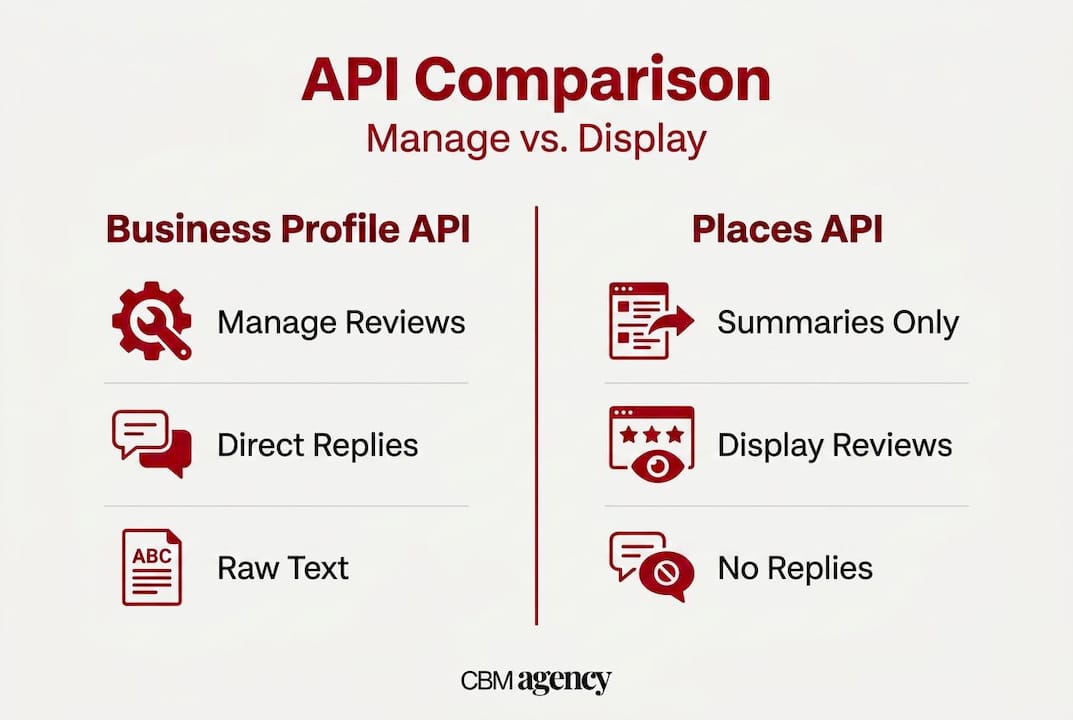
Here is a side-by-side comparison to make that distinction concrete:
| Feature | Business Profile API (Reviews) | Places API (Summaries) |
|---|---|---|
| Access raw review text | Yes | No |
| See reviewer names and dates | Yes | No |
| Post or update replies | Yes | No |
| Delete your own reply | Yes | No |
| Works for your location only | Yes | Any public location |
| AI-generated sentiment summary | No | Yes |
| Requires verified GBP listing | Yes | No |
The practical takeaway: if you want to manage your reputation, you use the Business Profile API. If you want to display summarized sentiment on a website, Places API summaries might fit. Most transportation operators need both for different use cases.
One more misconception worth addressing directly. Some operators search for ways to pull competitor reviews using third-party scraping tools. This approach is not only unreliable but also violates Google's terms of service. Scraped data returns inconsistently, duplicates often appear, and pagination breaks at scale. Worse, using these methods can get your account flagged. The only reliable, compliant path is working with your own Google Business Profile through the official API.
How the Reviews API works for your transportation business
Now that you know what the API is, let's see exactly how it works for a transportation or services operator, step by step.
Getting set up: the technical baseline
- Register your application in the Google Cloud Console. Create a project and enable the Google Business Profile API for that project.
- Obtain OAuth 2.0 credentials. You need a client ID and client secret. OAuth 2.0 credentials are how Google verifies that your software has permission to act on behalf of your business account.
- Authorize access. Walk through the OAuth consent flow so your account grants the application permission to read and write to your Business Profile data, including review resources.
- Verify your business location. The API only returns data for locations you own and have verified inside Google Business Profile. If you manage multiple fleet operations or service areas, each location needs to be claimed and verified separately.
- Make your first API call. The review endpoints are organized under "v4.accounts.locations.reviews`. The main methods are List (get all reviews for a location), Get (retrieve a single review by ID), and UpdateReply or DeleteReply for managing responses.
Common workflows in practice
Once you are authorized, you can build some genuinely useful automated workflows. Here are the primary ones that directly benefit transportation operators:
| API Endpoint | Business Use |
|---|---|
accounts.locations.reviews.list | Pull all recent reviews for a location into your dashboard |
accounts.locations.reviews.get | Retrieve details on a specific review for case management |
accounts.locations.reviews.updateReply | Post or update a reply to a customer review |
accounts.locations.reviews.deleteReply | Remove a reply if it contained an error or needs revision |
A practical example: imagine your dispatch team uses a simple operations dashboard. You integrate the reviews list endpoint so that every new review for your Miami fleet location appears alongside that day's booking data. A driver gets a three-star rating with a comment about wait time. Your operations manager sees it, flags it, and posts a personalized reply before the shift ends. That kind of speed signals to Google and to future customers that you take service seriously.

For creating a Google Business Page correctly before any API integration, the setup steps matter. A poorly configured profile will limit what the API can return and who can access it.
Pro Tip: If you operate multiple locations across different Caribbean islands or US metro areas, set up per-location review management rather than a single blanket feed. This lets you route reviews to the team member actually responsible for that service area, making replies faster and more accurate.
The SEO and marketing tips at CBM Agency's blog go deeper on connecting your review strategy to broader visibility goals, which is the next logical step after you have the API working.
Important limitations, moderation, and compliance realities
Understanding the workflows is essential, but steering clear of hidden pitfalls is just as critical for sustainable reputation management.
What the API cannot do
- It does not give you access to competitor reviews. Full stop.
- It does not let you delete customer-submitted reviews. Only Google can remove reviews for policy violations.
- It does not guarantee instant posting of your replies. Moderation states exist and matter.
- It does not bypass Google's usage limits. Hitting rate limits without proper error handling can temporarily block your application.
Moderation states you need to know
This is the detail most guides skip entirely. When you post a reply via the API, that reply does not always go live immediately. Google's review reply workflows can involve moderation states, which the API reports as a field called ReviewReplyState. Possible states include PENDING, REJECTED, and APPROVED.
If your automation assumes a reply goes live the moment the API call returns a success code, you could end up with customers who never see your response. Worse, if a reply is REJECTED due to content policy issues and your system does not catch that state, you have a silent failure. Build your workflow to check reply state, not just API call status.
"Automated review management without moderation checks is like sending a chauffeur to the wrong airport. The action happened, but the result is not what the customer needed."
Scraping and unofficial approaches: a real risk
Some third-party tools promise review data beyond what the official API provides. These tools often use scraping techniques that produce inconsistent pagination and incomplete results. They can pull duplicate entries, miss newer reviews, and sometimes misattribute data between locations. More seriously, using these tools puts your Google account at risk of suspension.
For AI search visibility and compliance, building on Google's official infrastructure is the only path that remains stable as Google updates its systems. Unofficial tools break silently when Google changes its structure, and you may not notice until your review data is weeks out of date.
Pro Tip: Always maintain a local backup of your review data, including the text, rating, and timestamp. Google can occasionally remove reviews for policy reasons, and having a record protects you during disputes or if you need to audit reply performance over time.
Real-world results: impact of review automation in transportation
Armed with the facts and limitations, let's see what real businesses have accomplished by integrating these tools into everyday workflows.
Where automation actually changed business outcomes
- Immediate reply to five-star reviews. A Caribbean charter company automated thank-you replies to all five-star reviews within two hours of posting. Over six months, their average rating climbed from 4.2 to 4.7. More importantly, new customers cited the active engagement as a trust signal when booking.
- Rapid complaint response. A Miami-based chauffeur fleet integrated review alerts into their dispatch software. When a three-star or lower review arrived, a notification fired to the operations manager immediately. Average complaint response time dropped from four days to under twelve hours, and several resolved complaints resulted in customers updating their ratings upward.
- Volume-based reply workflows. A regional transportation company operating across three US metro areas used batch reply workflows to respond to all new reviews every evening. Before automation, fewer than 20% of reviews received any reply. After integration, reply rate hit 95%, and new review volume increased by 30% over the following quarter because responsive businesses attract more reviews organically.
- Review data feeding booking decisions. One operator pulled structured review data into their CRM to identify which drivers, routes, or service types generated the most complaints. This operational insight led to specific training interventions and improved booking conversion by informing service quality decisions.
Choosing the right display method for your use case
The most reliable use case for the Business Profile API is building internal reputation workflows: fetch reviews, then publish and update responses. For external display on your website or app, whether to show individual reviews or summaries depends on your audience. Individual reviews with specific details build trust but require consent management. AI summaries via Places API are simpler to display and require no individual review handling.
| Goal | Best Tool | Why |
|---|---|---|
| Respond to reviews efficiently | Business Profile API | Direct reply access |
| Display testimonials on website | Places API summaries or manual selection | Simpler integration |
| Monitor complaint patterns | Business Profile API | Full review text and metadata |
| Show general star rating widget | Places API | No individual data handling needed |
How to measure impact: track your average star rating monthly, monitor the volume of new reviews week over week, and correlate your reply rate with changes in booking inquiries. The operators who get more bookings from Google are the ones treating review management as a revenue activity, not an afterthought.
You can also benchmark your results against your starting profile by reviewing what CBM Agency's results look like for transportation clients, which gives you a realistic target range.
Our take: what most articles miss about Google Reviews API for local transport
Here is what we see consistently after working with transportation businesses across the US and Caribbean: the operators who get the best results from the Google Reviews API are not the ones with the most sophisticated technical setup. They are the ones with the most consistent human judgment behind their automation.
Most guides focus heavily on how to configure OAuth credentials or which endpoints to call. That matters, but it is the first five percent of the job. The other 95 percent is workflow design, moderation handling, and making sure that automated replies do not sound like they were written by software.
The uncomfortable truth is that Google penalizes robotic-sounding replies just like it penalizes keyword stuffing. A wave of identical "Thank you for your five-star review!" replies looks suspicious to Google's systems and reads as hollow to real customers. The businesses that actually move their ratings are the ones using automation to flag and route reviews quickly, then having a real person write or at minimum personalize the reply before it posts.
We also see operators skip moderation checks entirely. One regional limousine company automated replies without monitoring for REJECTED states. For three months, a meaningful percentage of their replies were never going live. They thought they were responsive. Customers saw silence.
Another consistent mistake is relying on third-party scraping tools to monitor what competitors are doing. It feels like competitive intelligence. In practice, the data is often incomplete, the pagination breaks, and the risk to your own account is real. Watch the AI search behaviors shaping how customers find local businesses instead. That is the real competitive intelligence.
The real opportunity in all of this is not technical. It is cultural. Build review management into your operations rhythm the same way you manage dispatch or vehicle maintenance. When everyone on your team understands that a three-star review is a service recovery opportunity, not just a bad score, your reputation improves faster than any API integration alone can deliver.
How CBM Agency can boost your Google reviews success
Ready to turn best practices into measurable business wins? Here's how expert help makes all the difference.
Integrating the Google Reviews API correctly takes more than following documentation. It takes knowledge of how transportation businesses actually operate, where review workflows break down, and how to connect reputation management to real booking outcomes.
CBM Agency specializes in exactly this. We build reputation management workflows tailored to chauffeur companies, charter operators, and multi-location transport businesses across the US and Caribbean. From Google Maps service results to full business profile optimization, we connect your review strategy to the local SEO signals that drive actual calls and bookings. Whether you need API integration support, compliance-safe review automation, or a complete local search overhaul, our complete local SEO solutions are built for businesses like yours. Book a strategy call and let's build a review system that works while your fleet is on the road.
Frequently asked questions
Can I see competitor reviews with the Google Reviews API?
No, Google's API only provides review data for your own claimed Business Profile locations. Competitor scraping is unsupported, unreliable, and violates Google's terms of service.
What does the moderation status mean when I reply to reviews via the API?
Review replies may be held as PENDING, REJECTED, or APPROVED depending on Google's content moderation. Automation workflows must account for these states or your replies may never go live.
Can I use the API to delete a negative review?
No. No API method allows deleting or hiding full customer reviews. Only review replies can be deleted, and only Google can remove an actual review for policy violations.
What is the difference between the Business Profile API and Places API for reviews?
The Business Profile API manages your own full reviews and replies for verified locations. The Places API provides AI-generated review summaries for any public location, without access to individual review data or reply controls.