

Most transportation businesses lose bookings before a potential customer ever reads a single word on their website. The problem is not their service or pricing. It is their mobile presence. If your site loads slowly, your "Book Now" button is too small to tap, or your Google Business Profile is incomplete, you are invisible to the people searching for rides on their phones right now. This mobile SEO guide for service providers walks you through exactly what to fix, in what order, and how to confirm it is working so your business shows up when it matters most.
Table of Contents
- Understand the mobile SEO essentials for transportation services
- Prepare your site and Google Business Profile for mobile success
- Execute mobile SEO technical improvements for better user experience
- Verify mobile SEO performance and maintain improvements
- Why mastering mobile SEO is a game changer for U.S. transportation providers
- Boost your transportation service visibility with expert SEO support
- Frequently asked questions
Key Takeaways
| Point | Details |
|---|---|
| Mobile-first indexing | Google ranks sites primarily based on the mobile version, so mobile content parity is essential. |
| Core Web Vitals matter | Focus on improving LCP, INP, and CLS to boost mobile user experience and search rankings. |
| Google Business Profile compliance | Use relevant, non-promotional descriptions and update posts consistently for local engagement. |
| Optimize tap targets | Ensure clickable areas are large and spaced to enhance mobile usability and avoid ranking penalties. |
| Regular monitoring | Audit mobile SEO performance with Search Console and PageSpeed Insights to maintain improvements. |
Understand the mobile SEO essentials for transportation services
Before you touch a single line of code or update your Google profile, you need to understand what Google actually measures. Mobile-first indexing means Google uses the mobile version of your page for ranking and indexing, not the desktop version. That is the starting point for every mobile SEO tip in this guide. If your mobile site is missing content, loads slowly, or breaks on smaller screens, Google notices and your rankings suffer.
The three metrics Google uses to evaluate your mobile experience are called Core Web Vitals. These are not abstract scores. They measure real user frustration:
- Largest Contentful Paint (LCP): How long it takes for the main content (usually your hero image or headline) to appear on screen. Aim for under 2.5 seconds.
- Interaction to Next Paint (INP): How quickly your page responds when a user taps a button. Under 200 milliseconds is the target.
- Cumulative Layout Shift (CLS): Whether elements jump around as the page loads, which causes users to tap the wrong thing. Keep it below 0.1.
Core Web Vitals metrics are key mobile ranking factors tied directly to user experience. A slow or unstable page does not just frustrate visitors. It actively costs you ranking positions in local search results.
Beyond speed, mobile usability factors matter just as much. Fonts need to be readable without zooming. Buttons need to be large enough to tap confidently. These details feel minor until you realize that a customer on the highway looking for an airport car service has about three seconds of patience before they move on to your competitor.
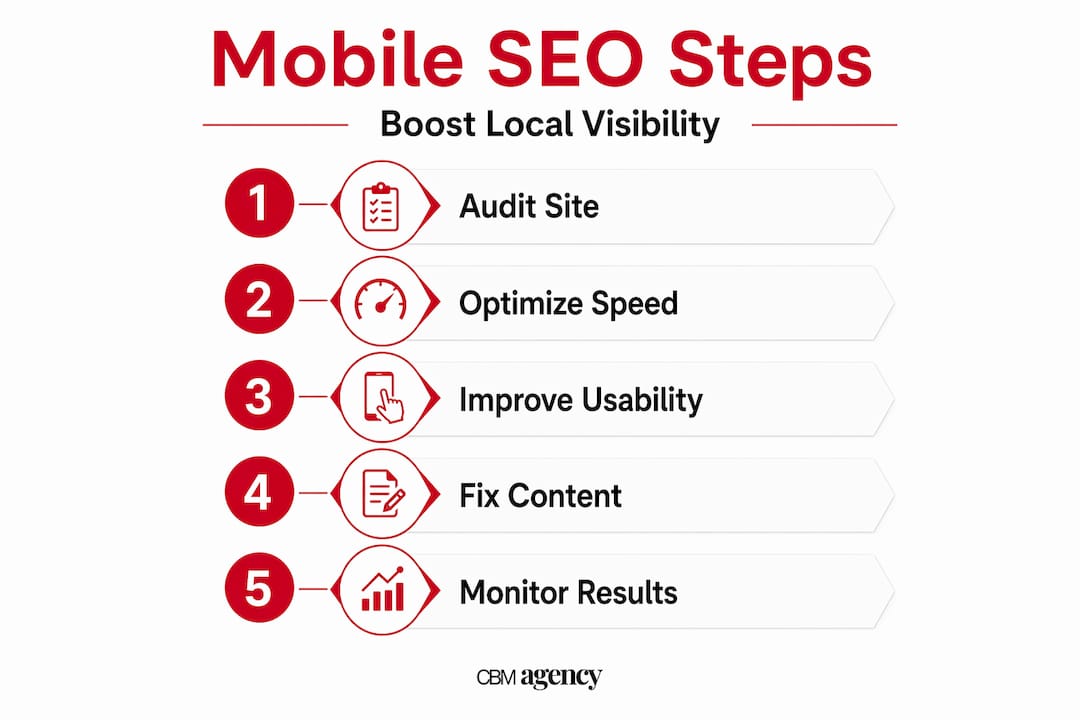
Here is a quick look at how mobile SEO factors compare in terms of impact and difficulty:
| Mobile SEO factor | Impact on rankings | Difficulty to fix | Priority |
|---|---|---|---|
| Mobile-first indexing readiness | Very high | Low to medium | Immediate |
| Core Web Vitals (LCP, INP, CLS) | High | Medium to high | High |
| Tap target size and spacing | Medium | Low | High |
| Readable font size (16px+) | Medium | Low | Medium |
| No horizontal scrolling | Medium | Low | Medium |
| HTTPS and security | High | Low | Immediate |
For a broader look at seo best practices for transportation businesses, these mobile factors sit at the top of the priority list. And if you want to see how corporate transportation SEO tips play out in a competitive market, the fundamentals here apply directly.
Now that you understand key mobile SEO concepts, let's prepare your site and online presence for optimization.
Prepare your site and Google Business Profile for mobile success
Preparation is where most transportation providers skip ahead and pay for it later. Before you fix anything, audit what you have. Pull up your website on your actual phone, not a desktop browser preview. Can you read the text without zooming? Can you tap the phone number or booking button without pinching? Does the page show the same content you see on desktop?

Content parity is critical. If your desktop site lists 10 services but your mobile version only shows 5, Google sees the shorter version and ranks you accordingly. Check every page, especially your service pages and contact information.
Your Google Business Profile is equally important. This is the listing that appears in Google Maps and the local pack when someone searches "car service near me." Your Google Business Profile description must be relevant, helpful, and avoid prohibited content like promotional-only text or links. That means no "Call us today for 20% off!" in the description. Instead, describe what you do, who you serve, and what makes your service reliable.
Here is what a strong preparation checklist looks like:
- Confirm your site uses responsive design (one URL, adapts to screen size) or correct m-dot canonical setup
- Verify all phone numbers are clickable tel: links on mobile
- Check that your Google Business Profile has accurate hours, service areas, and categories
- Add high-quality photos of your vehicles and team to your profile
- Confirm your business name, address, and phone number match exactly across your website and Google profile
Google Business Profile posts can include descriptions, photos, and action buttons. Scheduling recurring posts maintains local engagement and signals to Google that your business is active. Post about seasonal offers, new service routes, or fleet updates. Even one post per week keeps your profile fresh.
Pro Tip: Use the "Book" or "Call" action button on your Google Business Profile posts. For a transportation service, that direct path from search result to booking is worth more than any amount of keyword stuffing.
You can also optimize your Google Business Profile further with structured service listings and Q&A management. And if you want to see exactly how this connects to real bookings, the data on increasing bookings with Google Business Profile is worth your time. For local updates for transportation providers, consistent posting is one of the most underused tools in the industry.
| Preparation task | Time to complete | Impact on mobile SEO |
|---|---|---|
| Mobile content audit | 1 to 2 hours | High |
| Responsive design check | 30 minutes | Very high |
| Google Business Profile update | 1 hour | High |
| Weekly Google Posts | 15 minutes per post | Medium to high |
| Photo uploads to profile | 30 minutes | Medium |
With your preparations complete, the next section will guide you through the technical implementation to enhance mobile SEO performance.
Execute mobile SEO technical improvements for better user experience
This is where the actual work happens. Technical mobile SEO is not glamorous, but it is the difference between a site that converts and one that just sits there. Follow these steps in order:
-
Fix tap targets. Google flags tap targets smaller than 48x48 CSS pixels and elements placed too close together as mobile usability issues. Your "Call" and "Directions" buttons are the most important. If they are too small or crowded, users misfire and leave. Use your browser's developer tools to measure and adjust.
-
Improve LCP with image optimization. Your hero image is almost always the LCP element. Serve it in WebP or AVIF format (significantly smaller file sizes than JPEG or PNG) and add a "<link rel="preload">` tag in your HTML so the browser fetches it immediately. Slow hero image loading is the most common LCP issue, and it is also one of the easiest to fix.
-
Reduce INP with JavaScript cleanup. Long JavaScript tasks block the browser from responding to taps. Audit your site for scripts that run on page load and are not immediately needed. Defer them. A booking widget that loads 300ms after the page is ready is better than one that freezes the whole page for 2 seconds.
-
Eliminate CLS by sizing your images. Always include
widthandheightattributes on every image tag. This tells the browser how much space to reserve before the image loads, preventing the layout from jumping. Ads and embeds are another common CLS culprit. Reserve space for them in your CSS. -
Remove horizontal scrolling. Any element with a fixed pixel width wider than the screen causes horizontal scroll. Search your CSS for
width: 600pxstyle declarations and replace them withmax-width: 100%.
| Optimization | Difficulty | Time to implement | Core Web Vital affected |
|---|---|---|---|
| WebP/AVIF image conversion | Low | 1 to 2 hours | LCP |
| Image preloading | Low | 30 minutes | LCP |
| Defer non-critical JavaScript | Medium | 2 to 4 hours | INP |
| Add image dimensions in HTML | Low | 1 hour | CLS |
| Fix tap target sizes | Low | 1 to 2 hours | Usability |
| Remove fixed-width elements | Medium | 2 to 3 hours | Usability |
Pro Tip: Run your site through Google's free PageSpeed Insights tool before and after each change. It shows you exactly which Core Web Vitals are failing and gives specific recommendations tied to your actual URL, not generic advice.
For a deeper look at technical mobile SEO optimizations that go beyond the basics, the same principles apply whether you run a single vehicle or a full fleet operation.
After implementing these improvements, you should verify their effectiveness before completing your mobile SEO efforts.
Verify mobile SEO performance and maintain improvements
Fixing things without checking whether they worked is how transportation businesses end up repeating the same mistakes. Verification is not optional. Here is what to monitor and how:
- Google Search Console Mobile Usability report: Shows specific pages with mobile issues like text too small to read or clickable elements too close together. Use the Mobile Usability report alongside the Core Web Vitals report to monitor your mobile SEO health over time.
- Core Web Vitals report in Search Console: Separates your URLs into "Good," "Needs Improvement," and "Poor" categories based on real user data. Focus on the "Poor" URLs first.
- PageSpeed Insights: Combines real-world field data from Google's Chrome User Experience Report (CrUX) with lab measurements from Lighthouse. Compare CrUX field data with lab tools like Lighthouse to prioritize real user issues rather than theoretical ones.
- Chrome DevTools Lighthouse: Run this directly in your browser for an on-demand audit. It breaks down performance, accessibility, and SEO scores with specific line-by-line recommendations.
- Mobile vs. desktop comparison: Always compare your mobile and desktop scores side by side. A score that looks fine on desktop can be failing on mobile due to image sizes, font scaling, or touch interaction issues.
Pro Tip: Schedule a full mobile SEO audit every quarter, and run a quick PageSpeed check any time you make significant changes to your site, add new pages, or install a new plugin. Regressions happen fast and quietly.
For ongoing monitoring and maintaining mobile SEO, consistency matters more than perfection. A site that is consistently "good" beats one that is briefly "excellent" and then ignored.
Having verified your mobile SEO success, here is a fresh perspective to further elevate your local transport service's mobile presence.
Why mastering mobile SEO is a game changer for U.S. transportation providers
Here is the honest truth most guides skip: mobile SEO is not just a ranking exercise. It is a trust exercise. When a customer searches for a black car service at 11pm before a 6am flight, they are not browsing. They are deciding in seconds. A fast, clean, easy-to-navigate mobile site says "we are reliable" before they have read a single review.
Most transportation providers we see focus on getting more Google reviews or adding more keywords. Both matter. But ignoring mobile SEO risks invisibility in a world where the mobile version is the source of truth for Google rankings. You can have 200 five-star reviews and still lose to a competitor with 40 reviews and a faster, better-optimized mobile site.
The local market dynamic makes this even more urgent. In cities like Miami, Chicago, or Los Angeles, you are not competing nationally. You are competing with the three or four providers who show up in the Google Maps local pack for "car service to airport." That pack is dominated by businesses that combine a strong Google Business Profile with solid mobile performance. Both have to work together.
There is also a longer-term play here. Integrating your mobile SEO with local community engagement, such as sponsoring local events, earning mentions from local news sites, and building citations in local directories, creates a compounding effect. Google rewards businesses that look genuinely embedded in their local area. Your mobile site is the landing pad for all of that local authority.
The businesses that convert searches into bookings treat their mobile site like a booking engine, not a brochure. That mindset shift is what separates the providers who grow from the ones whose fleet stays parked.
Boost your transportation service visibility with expert SEO support
Knowing what to fix and actually fixing it are two different things, especially when you are running a transportation business and do not have hours to spend in Google Search Console.
CBM Agency works specifically with transportation and service businesses to improve Google visibility, strengthen local SEO, and turn more searches into real bookings. From professional Google Business Profile management that keeps your listing compliant and compelling, to Google Maps local SEO expertise backed by real case studies, the work is built around what actually moves the needle for providers like you. Our targeted local marketing services cover the full picture, from mobile performance to local authority building, with ongoing monitoring so improvements hold over time. If your mobile presence is not converting, let's fix that.
Frequently asked questions
What is mobile-first indexing and why does it matter for my transportation business?
Mobile-first indexing means Google primarily uses the mobile version of your website for ranking and indexing, so your mobile site must have full content and strong usability to rank well in local search results.
How can I optimize tap targets for mobile users?
Make interactive elements like your "Call" and "Book" buttons at least 48x48 pixels with adequate spacing so users can tap them accurately. Google flags tap targets smaller than 48x48 CSS pixels as mobile usability issues that can hurt your rankings.
What should I include in my Google Business Profile description?
Include clear, helpful information about your services, service areas, and mission without promotional text, links, or irrelevant content. Your description must comply with Google's content policy to stay visible and avoid suppression.
Which tools can I use to monitor my site's mobile SEO performance?
Use Google Search Console's Mobile Usability and Core Web Vitals reports for real-user data, and combine them with PageSpeed Insights and Lighthouse audits. Comparing CrUX field data with Lighthouse lab results helps you prioritize fixes that affect actual users rather than just test scores.