

Updating business listings means maintaining accurate, consistent name, address, and phone (NAP) information across every platform where customers search for you. Google Business Profile, Yelp, Apple Maps, and local directories all pull from the same data signals to decide which businesses show up first. When your information conflicts across platforms, search engines lose confidence in your listing and push it down. Get this right, and your profile becomes a booking engine, not a brochure.
How to update business listings: tools and prep you need first
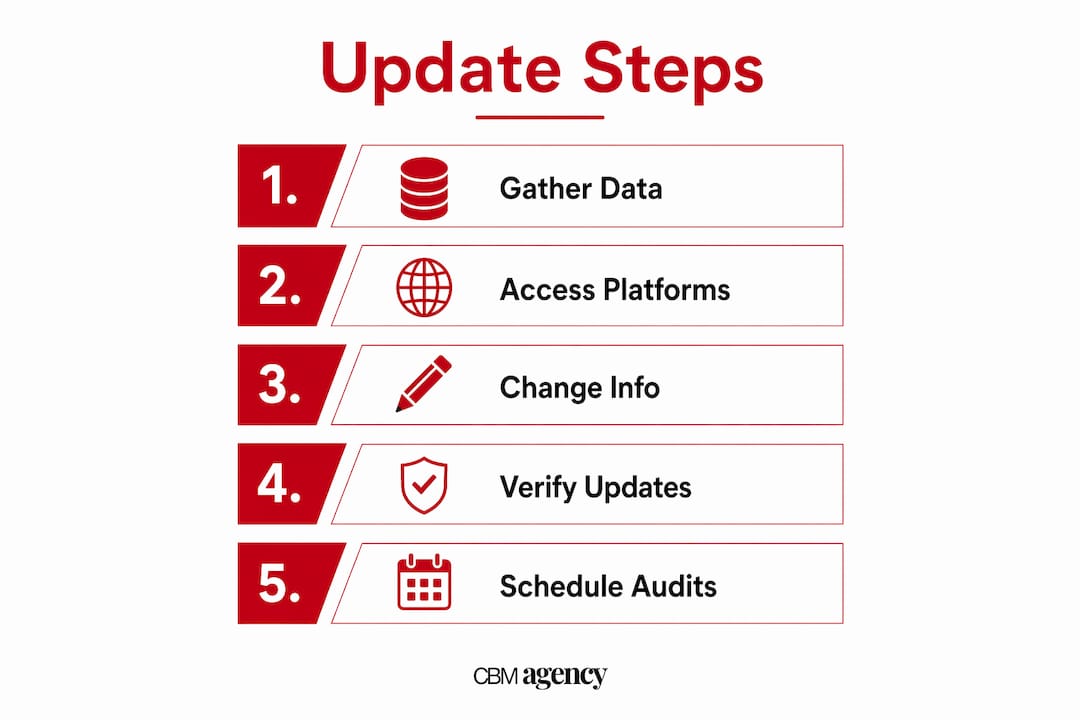
Before you touch a single field, gather everything in one place. Rushing into updates without a centralized dataset is how businesses end up with three different phone numbers across five platforms.
Here is what you need before starting:
- Official business name exactly as registered with your state
- Current physical address and mailing address (these may differ)
- Primary phone number and any tracking numbers you use
- Business hours including holiday and seasonal variations
- Service categories and a short, accurate business description
- High-resolution photos of your storefront, interior, team, and vehicles if applicable
- Website URL confirmed as live and correct
The two core platforms to access are your Google Business Profile dashboard and any directory management software you use. Tools like Birdeye offer a single dashboard to scan for inconsistent data across dozens of directories at once, which cuts manual errors significantly. That efficiency matters when you are managing more than one location or have not audited your listings in over a year.
If your business address has changed, you also need IRS Form 8822-B before updating any public-facing listings. Updating your directories before your official records creates a mismatch that can trigger verification issues down the line.

| Update method | Best for | Key limitation |
|---|---|---|
| Manual platform-by-platform | Single location, small changes | Time-intensive, high error risk |
| Centralized dashboard (e.g., Birdeye) | Multi-location, bulk updates | Subscription cost, learning curve |
| Google Business Profile manager | Google-specific updates | Does not cover Apple or niche directories |
| IRS Form 8822-B | Official address/party changes | Government processing time |
What are the steps to audit and update your Google Business Profile?
Auditing before editing is the move most business owners skip. It is also the reason their updates do not stick or create new conflicts.
Follow this sequence:
- Search your business name on Google. Look at the Knowledge Panel. Note every field that appears outdated, missing, or wrong.
- Claim or verify your profile if you have not already. Go to Google Business Profile, search your business, and follow the verification steps. Google offers phone, email, video, or postcard verification depending on your business type. Read more about what a business profile is before you start if you are new to this.
- Update core fields first. Address, phone number, website URL, and primary category. These carry the most weight for local search ranking.
- Set accurate hours, including special hours for holidays. Customers searching at 9 PM on Christmas Eve need to know if you are open.
- Add or refresh photos. Profiles with current, high-quality images consistently attract more clicks than those with outdated or stock images.
- Update your services list and attributes. If you added curbside pickup, a new service area, or a new vehicle class, add it now.
- Publish a Google Post. Weekly Posts or Updates keep your profile active and signal to Google that your business is current. Use them for promotions, announcements, or seasonal hours.
- Repeat the audit on Apple Maps, Yelp, Bing Places, and your top industry directories. Each platform has its own dashboard and verification flow.
Pro Tip: After updating hours or address on Google, search your business name plus "hours" from a private browser window. If the old information still shows, the update is still pending. Screenshot what you see and check again in 24 to 48 hours.
A common pitfall is updating Google first and leaving Apple Maps with stale data. Customers using iPhones get directions from Apple Maps by default. If your address is wrong there, they end up at the wrong location.
How do multi-location businesses manage listing updates without errors?
Managing listings for multiple locations is a different problem than managing one. The risk is not just outdated information. It is applying headquarters attributes to every location, which confuses both customers and search engines.
Multi-location update workflows require ownership models that allow distinct edits per location without overwriting local-specific details. Here is how to structure that:
- Assign location managers. Each location should have a designated person with editor access in Google Business Profile. They own the accuracy of that location's data.
- Create a master NAP spreadsheet. One row per location. Columns for address, phone, hours, categories, and last-updated date. This is your source of truth.
- Use a centralized tool for bulk pushes. Platforms like Birdeye let you push updates to multiple listings simultaneously while preserving location-specific fields.
- Never apply a blanket update without reviewing location exceptions. A downtown location may have different hours than a suburban one. A location near an airport may serve a different customer segment entirely.
- Verify each location individually after any bulk update. Bulk tools can misfire. A spot check on three to five locations after every major update catches errors before customers do.
Pro Tip: Build a quarterly calendar reminder to audit every location's listing. Set it for the week before major holidays, when hours changes are most likely and most damaging if wrong.
Centralized listings management reduces inconsistent citations and protects brand identity across every market you serve. For transportation businesses with vehicles operating across multiple cities, this is not optional. It is the difference between showing up in local search and being invisible.
Why do official business records matter for listing accuracy?
Your Google Business Profile is only as trustworthy as the official records behind it. When your IRS records, state registration, and website all show the same address and business name, search engines treat your listing as verified and reliable.
IRS Form 8822-B is the mechanism for notifying the IRS of changes to your business mailing address, physical location, or responsible party. Responsible party changes carry a 60-day reporting requirement. Missing that window creates a discrepancy between your tax records and your public-facing information, which can complicate verification on Google and other platforms.
The correct update sequence when your address changes:
- File IRS Form 8822-B first
- Update your business website (this is your primary source of truth for search engines)
- Update Google Business Profile
- Update Apple Business Connect
- Update broader directories last
Treating NAP as a controlled dataset and updating official sources first prevents search engines from displaying contradictory information. AI-powered search surfaces like Google's AI Overviews and Perplexity pull from multiple data points simultaneously. If your website says one address and your IRS records reflect another, the conflict surfaces in ways that are hard to diagnose and slow to fix.
Updating your website before your directories is not just best practice. It is the mechanism that controls what AI search tools report about your business.
How do you verify that listing updates actually went through?
Submitting an update and confirming it went live are two different things. Google can take anywhere from 10 minutes to 30 days to reflect edits on your business profile, depending on the type of change and whether it triggers a manual review.
Here is how to verify updates correctly:
- Search your business name from a private browser window on both desktop and mobile. Private browsing bypasses cached results and shows you what a new customer sees.
- Search your business name plus your city and "hours" to check if updated hours appear in the Knowledge Panel.
- Check Google Maps on an iPhone. Apple Maps and Google Maps can show different data. Confirm both are correct.
- Take dated screenshots of your listing after every update. If a platform reverts your change (which happens), you have a record of what was submitted and when.
- Check for duplicate listings. Search your business name plus your old address. If a duplicate listing appears, claim it and mark it as closed or merge it with your primary listing.
Pro Tip: If your update is stuck in "pending" status for more than two weeks on Google Business Profile, try re-submitting the edit or reaching out through Google's support chat. Some edits trigger a manual review queue that requires a nudge.
Stale data from old listings can override your current updates if duplicates exist. Removing duplicates is not optional cleanup. It is a prerequisite for accurate listings.
Key takeaways
Accurate, consistent business listings across Google, Apple Maps, and directories are the foundation of local search visibility and customer trust.
| Point | Details |
|---|---|
| Prepare before you edit | Gather official NAP data, photos, and IRS records before touching any platform. |
| Follow the update sequence | Update your website first, then Google, then Apple, then directories to prevent conflicts. |
| Manage multi-location carefully | Assign location managers and use centralized tools to avoid overwriting local details. |
| Verify after every update | Search your business from a private browser and take dated screenshots to confirm changes went live. |
| Treat updates as ongoing | Schedule quarterly audits and weekly Google Posts to keep listings fresh and trustworthy. |
Listing accuracy is a trust signal, not a chore
I have worked with transportation and service businesses long enough to see the same pattern repeat. A company invests in a new website, updates their branding, maybe even runs ads. But their Google Business Profile still shows the old address, the phone number goes to a disconnected line, and their hours say they close at 5 PM when they actually run 24/7. The website looks great. The listing kills the conversion.
What most business owners do not realize is that listing updates function as ongoing trust-building content, not administrative paperwork. Every time you publish a Google Post, refresh your photos, or update your service list, you are sending a signal that your business is active, credible, and worth ranking. Google rewards recency. So do customers.
The businesses I see win in local search are not the ones with the biggest ad budgets. They are the ones whose listings are clean, current, and consistent across every platform a customer might use. That includes AI search tools like Perplexity and Google's AI Overviews, which now surface business information directly in answers. If your data is inconsistent, those tools either skip you or report the wrong details.
My honest advice: stop treating your listings as something you set up once and forget. Build a quarterly audit into your calendar. Assign someone ownership. Make it a habit, not a crisis response.
— Meshia
Let Cbmagencymiami handle your listing updates
Cbmagencymiami specializes in Google Business Profile management and local SEO for transportation and service businesses. If your listings are outdated, inconsistent, or simply not driving calls and bookings, that is a fixable problem. The team at Cbmagencymiami handles everything from initial audits to ongoing updates, multi-location coordination, and AI search optimization. You focus on running your business. We make sure every search leads customers to the right information. Explore Google Business Profile management services or review a real Google Maps case study to see what accurate, managed listings actually deliver.
FAQ
How often should I update my business listings?
Update your listings immediately when any core information changes, such as address, phone, or hours. Beyond that, publish Google Posts weekly and run a full audit quarterly to catch drift across platforms.
How do I claim my business profile on Google?
Go to Google Business Profile, search your business name, and select "Claim this business." Google will walk you through verification via phone, email, video, or postcard depending on your business type.
How long does it take for Google to show my updates?
Google can take anywhere from 10 minutes to 30 days to reflect edits, depending on the type of change and whether it triggers a manual review. Check from a private browser window to see the current live version.
What is IRS Form 8822-B and when do I need it?
IRS Form 8822-B notifies the IRS of changes to your business address or responsible party. File it before updating your public listings to keep your official records and online information consistent.
What causes inconsistent information across directories?
Inconsistent listings usually result from updating one platform without updating others, old duplicate listings that were never removed, or data aggregators pushing outdated information. A centralized management tool like Birdeye helps prevent this by syncing updates across platforms from one dashboard.