

You put time and money into local SEO, but how do you actually know it's working? That's the real question most transportation business owners can't answer clearly. Knowing how to track local SEO results is not optional if you want to grow. Without it, you're guessing which keywords bring in airport runs, which neighborhoods your Google profile reaches, and whether your phone calls are coming from Google or somewhere else entirely. This guide walks you through the tools, the metrics, and the step-by-step process to measure local SEO success the right way, specifically for transportation and chauffeur businesses.
Table of Contents
- Key Takeaways
- How to track local SEO results: setting up your tools
- Tracking local search rankings across your service area
- Measuring engagement signals from your Google Business Profile
- Using GA4 and Search Console for deeper insights
- Common tracking mistakes to avoid
- Verifying your tracking data shows real progress
- My take on tracking local SEO in transportation
- How Cbmagencymiami helps you track and grow
- FAQ
Key Takeaways
| Point | Details |
|---|---|
| Set up your tools first | Connect Google Business Profile, Google Analytics 4, and Search Console before you track anything. |
| Track rankings by location | Use grid-based tools to see where your business ranks across specific neighborhoods and service zones. |
| Focus on engagement over views | Calls, direction requests, and clicks show real leads; profile views alone tell you nothing useful. |
| Use GA4 and Search Console together | Combine both platforms to verify local organic traffic and monitor keyword trends over time. |
| Review data monthly, not daily | Monthly reporting reveals meaningful trends and prevents overreacting to short-term fluctuations. |
How to track local SEO results: setting up your tools
Before you can measure anything, you need the right accounts connected and configured. Skipping this step is like trying to read a map before you print it. The data exists, but you cannot access it.
Here are the four platforms every transportation business needs in place:
- Google Business Profile (GBP): Your profile is the front door to your local presence. Claim it, verify it, and make sure your service areas, categories, and contact information are accurate.
- Google Search Console (GSC): This free tool shows you which search queries are bringing users to your website, your average position in results, and your click-through rate.
- Google Analytics 4 (GA4): GA4 tracks what happens after someone lands on your website, including which pages they visit, how long they stay, and whether they complete a booking or contact form.
- Local rank tracking software: Tools like BrightLocal or Whitespark let you track your keyword positions across specific zip codes and cities rather than just a national average.
A consolidated SEO dashboard that integrates GBP, GSC, and GA4 gives you a centralized view of your local SEO performance metrics without toggling between five browser tabs. Looker Studio is a free option that pulls all three data sources into one live report.
Before you make any optimization changes, record your baseline. Write down your current keyword positions, your monthly profile views, your call volume, and your organic website sessions. These numbers are your starting point. Without them, you cannot prove progress later.
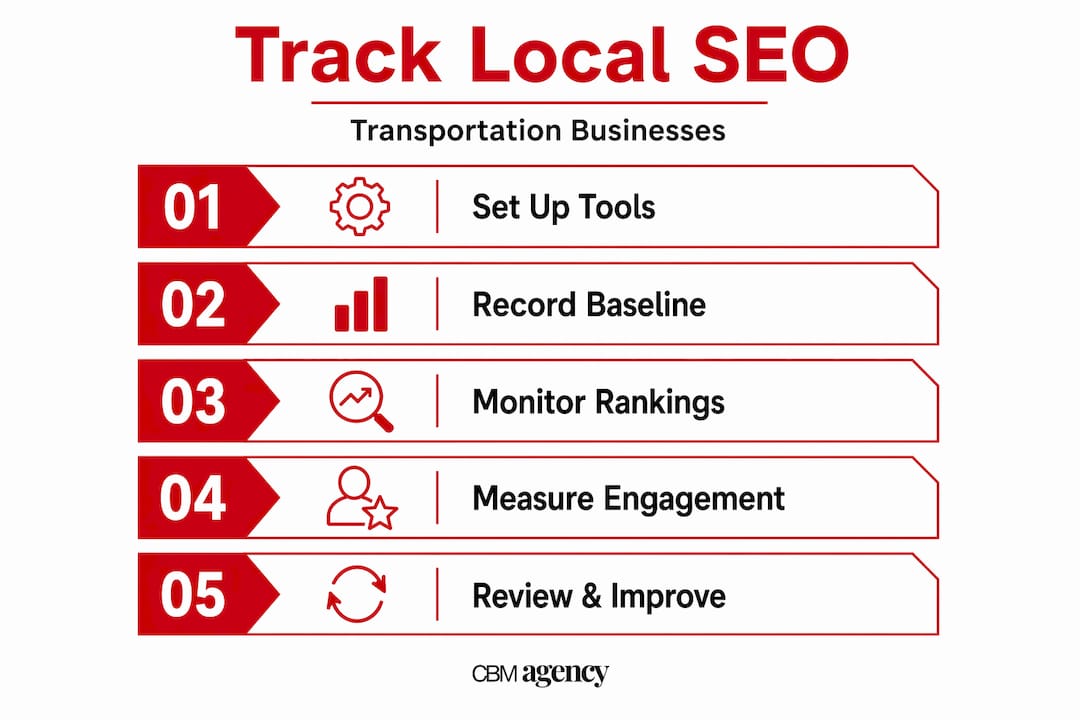
Pro Tip: Set up a simple Google Sheet with your baseline numbers and update it monthly. This gives you a running record that's easy to share with your team or an agency without digging through platform dashboards.
Tracking local search rankings across your service area
Position tracking for transportation businesses is more complex than checking if you rank number one for "limo service." Local search results vary by location, so the same search query returns different results depending on where the searcher is standing. A potential client in downtown Miami sees different results than one searching from the airport or the suburbs.
Grid-based rank tracking solves this problem. Here is how to use it effectively:
- Choose a grid tracking tool. Grid-based tools like BrightLocal display your Google Maps ranking across a geographic grid, often with dots color-coded by position. Green means you rank in the top three. Red means you are invisible in that area.
- Select your core keywords. For transportation businesses, these typically include terms like "airport transportation [city]," "chauffeur service near me," and "corporate car service [neighborhood]."
- Set your grid center point. Place the grid center at your primary business address or the center of your main service zone. Most tools let you adjust the grid size in miles.
- Run your scan and save the results. This becomes your baseline grid. Run the same scan each month to compare.
- Identify your weak zones. Look for clusters of red or orange dots. These are neighborhoods where competitors are outranking you, and they represent bookings you are currently missing.
When you analyze your grid results, resist the temptation to celebrate a top-three ranking in one spot and ignore the rest. What matters is your overall visibility score across the full map. A good tool will calculate this as an average ranking or a visibility percentage across all grid points.
Pro Tip: Run your grid scans at the same time of day and day of the week each month. Rankings can fluctuate slightly based on when scans are run, so consistency makes your month-over-month comparisons more reliable.
Common challenges include ranking well near your office but poorly in neighboring cities you serve. This often means your website content or GBP service areas need to reflect those locations more clearly. You can learn more about this in the Google Maps ranking guide tailored specifically for transportation businesses.
Measuring engagement signals from your Google Business Profile
Rankings tell you where you appear. Engagement metrics tell you whether people are actually responding. This distinction matters more than most business owners realize.

Your Google Business Profile Insights dashboard tracks several key actions:
| Metric | What it tells you | Why it matters |
|---|---|---|
| Phone calls | Number of calls initiated from your profile | Direct connection to bookings and revenue |
| Direction requests | Users asking for directions to your location | Signals in-person or pickup intent |
| Website clicks | Users clicking from your profile to your site | Indicates interest that may convert later |
| Photo views | Number of times your photos are viewed | Engagement indicator, not a conversion signal |
The most important thing to understand: focus on calls, direction requests, and website clicks rather than total profile views. Views are a vanity metric. A thousand people can see your profile and do nothing. Thirty calls in a month from your profile is meaningful data.
For transportation businesses with multiple locations or service areas, segmenting your GBP data by location is the move most operators miss. You may have one profile performing strongly while another sits underutilized. Location-level data tells you exactly where to focus your optimization energy.
Call tracking tools like CallRail take this one step further by assigning unique phone numbers to your GBP profile and your website separately. This tells you not just that a call happened, but exactly which source drove it. For a transportation company managing dozens of bookings a week, that attribution data is the difference between knowing your ROI and guessing it.
Pro Tip: Compare your calls and direction requests week over week during peak seasons like holidays and major local events. Transportation demand spikes during these periods, so your GBP engagement should spike too. If it doesn't, that's a signal your profile isn't positioned to capture demand when it's highest.
Using GA4 and Search Console for deeper insights
Google Business Profile insights show you what happens on your profile. GA4 and Search Console show you what happens on your website. Together, they give you a complete local SEO performance picture.
In GA4, the most useful configuration for local SEO tracking includes:
- Create a custom report filtering for organic traffic from your target cities or regions using the "Session source/medium" dimension set to "google/organic."
- Set up conversion events for your most important actions: form submissions, booking completions, and phone number clicks.
- Use the "Landing page" report to identify which pages drive the most organic sessions and which convert best.
- Compare month-over-month organic sessions to spot growth trends that align with your optimization work.
In Google Search Console, GA4 filters and Search Console queries help you identify which search terms are actually driving traffic and how your rankings have changed over time. Open the Performance report and filter by queries containing your city name or service type. Look for keywords where you get impressions but low clicks. Those are opportunities to improve your title tags and meta descriptions to earn more of the traffic that is already finding you.
One underused tactic: track non-branded keyword growth over time. If your branded searches (people searching your company name directly) are growing but non-branded local searches are flat, you are not attracting new customers who don't already know you. That's a warning sign worth addressing. Learn how a stronger local SEO strategy can shift that balance for transportation businesses.
Common tracking mistakes to avoid
Even businesses that set up their tools correctly often read the data wrong. Here are the most frequent missteps in tracking local SEO results, and what to do instead.
- Tracking national rankings instead of local ones. If your rank tracking tool isn't set to pull results from your specific city or service area, you're looking at data that doesn't reflect your actual local performance.
- Averaging data across all locations. One strong-performing location can mask a failing one when you look at aggregate numbers. Always break performance down by individual service area or profile.
- Ignoring call tracking. Many transportation businesses only look at GBP views and website sessions, completely missing phone-based leads that never touch their website. Calls from GBP directly correlate with actual revenue for service businesses.
- Reacting to daily fluctuations. Local rankings move constantly. Making strategy changes based on a single day's data leads to poor decisions.
"Focus on visibility trends over time rather than chasing fixed ranking spots. Rankings are fluid, and the businesses that win locally are the ones that build consistent presence, not the ones obsessing over the number one position today."
When your data shows an unexpected drop, work through a logical checklist before changing your strategy. Check if your GBP profile received any new flags or edits. Look at Search Console for coverage errors or manual penalties. Verify your NAP (name, address, phone number) is consistent across directories. Most ranking drops have a traceable cause.
Verifying your tracking data shows real progress
Once your tracking systems are running, you need a process for evaluating whether they point to growth. Here is a monthly review sequence that works:
- Pull your grid scan report and compare to last month. Note which zones improved and which declined.
- Check GBP Insights for month-over-month changes in calls, direction requests, and website clicks.
- Open GA4 and compare organic sessions, landing page performance, and conversion completions to the prior month.
- Review Search Console for keyword position changes, particularly for your core local service terms.
- Read your new reviews and note recurring themes. Review sentiment and star ratings tie directly into local SEO performance because they signal trust to both Google and potential clients.
- Adjust your strategy based on what the combined data tells you, not what any single metric suggests.
The businesses that consistently improve their local search presence are the ones treating this review process as a non-negotiable monthly routine, not an occasional check.
My take on tracking local SEO in transportation
I've seen transportation businesses spend months improving their Google Business Profile and then feel frustrated because "nothing changed." When I dig into their data, the problem is almost always that they were measuring the wrong things. They were watching profile views climb while ignoring that their call volume was flat.
In my experience, call tracking and direction requests are the closest proxies to actual bookings for transportation companies. Ranking position matters, but a business that ranks number four and converts heavily beats a business ranking number one with zero calls.
What I've learned is that location segmentation reveals opportunities most operators never knew they had. When you break GBP data down by neighborhood rather than looking at totals, you often find that one service zone is quietly driving most of your leads while another zone is a total dead zone. That insight changes where you invest your content and optimization effort completely.
My strongest recommendation: do not try to track everything at once when you're starting out. Pick your three most important metrics, call volume from GBP, visibility score from your grid tool, and organic sessions in GA4, and watch those consistently for three months before adding more complexity. Building a clear picture slowly beats having a cluttered dashboard you don't trust.
— Meshia
How Cbmagencymiami helps you track and grow
If setting up these tracking systems feels like a heavy lift on top of running your actual transportation business, that's where Cbmagencymiami comes in.
Cbmagencymiami specializes in Google Business Profile management, local rank tracking, and full local SEO performance reporting for transportation and service businesses. You can see real results from businesses like yours in our Google Maps case study, where local visibility directly translated into more calls and bookings. If you're ready to stop guessing and start seeing exactly what your local SEO is doing for your business, our GBP management service is a strong starting point. Reach out and we will build a tracking setup tailored to your service areas and growth goals.
FAQ
What is the best tool for tracking local SEO rankings?
Grid-based tools like BrightLocal or Local Falcon are the best options for tracking local search rankings across specific geographic areas. They show you exactly where your business appears on Google Maps relative to your competitors, neighborhood by neighborhood.
How do I measure local SEO success beyond rankings?
Measure calls, direction requests, website clicks from your Google Business Profile, and organic conversions in GA4. These action-based metrics connect your visibility directly to leads and revenue, rather than just showing how often your profile appeared.
How often should I check my local SEO performance metrics?
Review your full set of local SEO performance metrics once a month. Daily checks lead to overreacting to normal fluctuations, while monthly reviews reveal real trends you can act on with confidence.
What is grid-based rank tracking and why does it matter for transportation businesses?
Grid-based rank tracking shows your Google Maps position across a geographic grid of points around your service area. For transportation businesses serving multiple neighborhoods or airport zones, it reveals exactly where you rank locally and where competitors are taking bookings you should be winning.
How do I connect my Google Business Profile data with my website analytics?
Use Looker Studio to pull GBP Insights, Google Search Console, and GA4 data into one dashboard. This gives you a side-by-side view of profile engagement and website performance so you can see how local visibility translates into actual website visits and conversions.